AI Agent Cloud Storage & File System
One cloud workspace.
For you and your
AI agents.
Keep your notes, files, research, and project context in one vault. Let your connected agents find what matters and save useful work back. Stay in sync across MindWiki Cloud, iPhone, and Mac.
Store it
Keep notes and supporting files together in your cloud vault.
Find it
Search your knowledge and follow the sources behind an answer.
Build on it
Let connected agents read context and save the next useful result.
Take it with you
Open the same vault on the web, iPhone, and Mac.
Shared project knowledge
Save the work once.
Build on it across agents.
Research with ChatGPT. Develop the brief with Claude. Bring the specification into your coding agent. The knowledge stays in your vault, ready for whatever comes next.
Explore the question
Save findings, references, and open questions.
Give the idea a direction
Read the evidence. Shape the brief and record the decision.
Pick up where the work left off
Retrieve the current plan and save the outcome.
The context lives in files you can open, refine, and keep using beyond any single conversation.
Explore agent workflowsBring your AI
Keep your knowledge
when you switch tools.
Connect the clients you use to the same MindWiki account. Each gets its own connection to your existing vault, with the access you authorize.
ChatGPT
Bring saved research, plans, and notes into your conversations.
View setup guideClaude
Read source context, develop ideas, and save useful work.
View setup guideCodex
Carry specifications, decisions, and handoffs into coding tasks.
View setup guideClaude Code
Retrieve project knowledge and record what changed.
View setup guideCursor
Keep project context close to the code you are working on.
View setup guideWindsurf
Bring the same vault knowledge into Cascade.
View setup guideMuse
Find the connector setup path for your Muse account.
View setup guideMore MCP clients
Use another compatible client or build your own integration.
View setup guideSetup depends on the client, app version, and provider account or workspace settings. MindWiki and your agent provider are separate services.
All integration guidesOne vault, wherever you work
Start on your phone.
Develop on your Mac.
Open it on the web.
Capture something worth keeping when it happens. Return to it on a larger screen. Your saved pages and supported attachments sync through the same cloud vault.
Your agents use that vault too. Their saved work appears alongside yours.
MindWiki Cloud
Write, search, capture, browse your knowledge, and manage your account and connections.
With you, anywhereMindWiki for iPhone
Capture an idea and read your knowledge when you are away from your desk.
Your native workspaceMindWiki for Mac
Local Markdown, attachment tools, interactive tables, Properties, and the visual knowledge graph.
Files with context
Keep the source
beside the thinking.
Store Markdown pages with images, PDFs, audio, video, and supporting attachments. Keep the original material close to the reason it matters.
A screenshot beside the decision it explains. A PDF linked to your research notes. A recording beside the summary you wrote from it.
Explore attachments and filesAdd attachments on Mac and open supported synced references on web. Preview and playback vary by file type and client.
Audience research
The findings, evidence, and open questions behind our launch.
Linked from: Launch Brief · Messaging Decision
“What did we decide about the launch, and why?”
- Find the relevant research and decisions.
- Read the source pages behind the results.
- Use the evidence to move the work forward.
projects/website-launch/decisions.mdFind what matters
Find the idea.
Even when you forget
the filename.
Search titles, page content, and metadata. Use hybrid keyword and semantic retrieval through supported agent tools to find knowledge by phrasing or meaning.
Follow a result into its linked notes, check the source, and keep working from the actual files.
Explore search and viewsReusable context
Skip the re-explaining.
Start with the right pages.
A project brief. Requirements. Key decisions. Your writing guidelines. Context Packs bring selected current pages together for recurring work.
Ask MindWiki to prepare context for a goal. It can select a pack, find additional sources, or help clarify which context you mean.
Learn about Context PacksWebsite Launch
The foundation for the next useful session.
A workspace you can use yourself
Write clearly.
Link ideas. Shape the page.
A quick note can grow into a working document. Live Markdown, slash commands, checklists, callouts, code blocks, tables, and wikilinks keep the structure close to the writing.
Explore the editor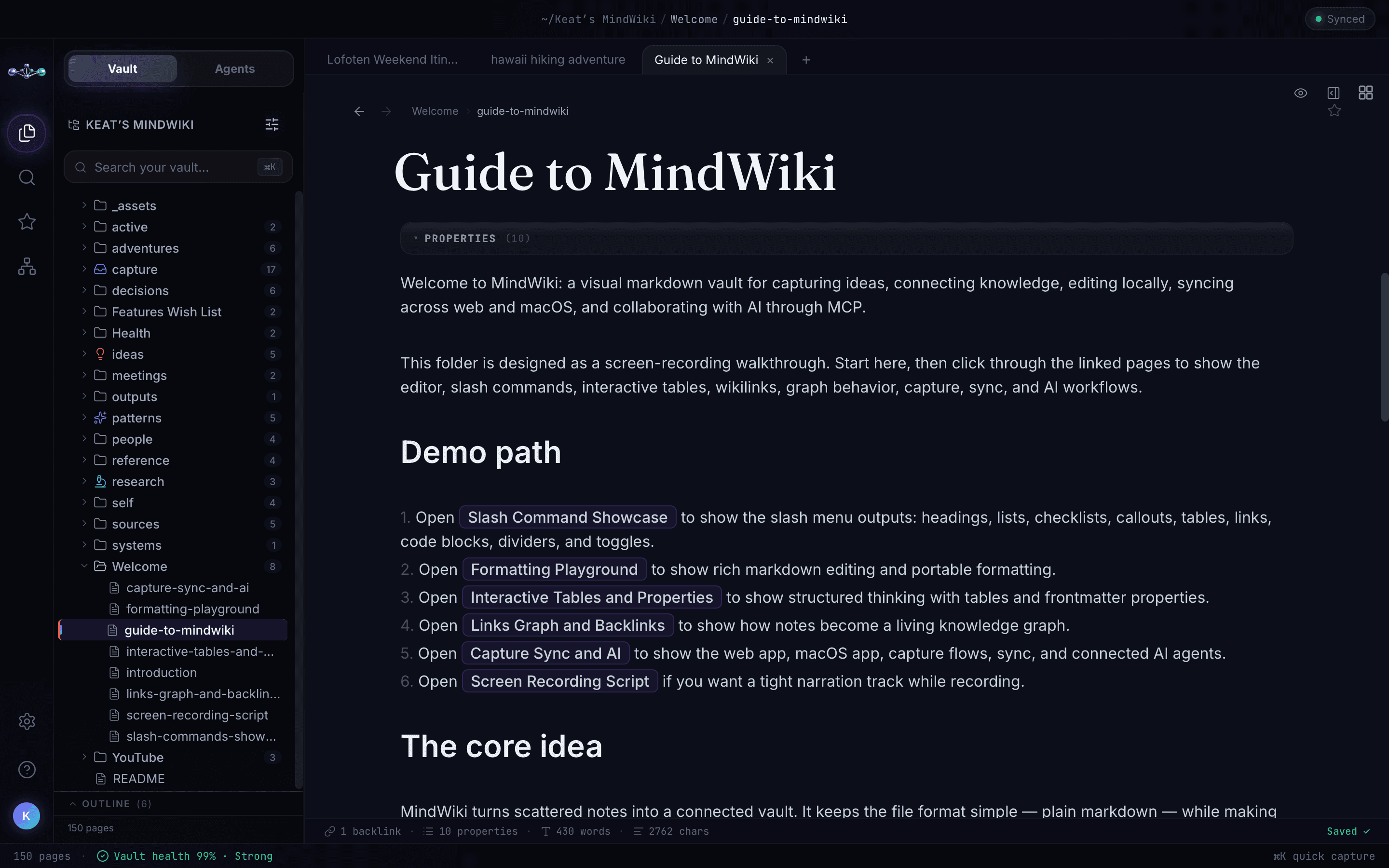
Keep writing
Insert useful blocks with slash commands and let auto-save handle the routine saving.
Connect the context
Link a source, reference a decision, or build a project hub as you write.
Go deeper on Mac
Use native attachments, tabs, the Inspector, and typed property controls.
Structure that grows with your work
More than one way
back to a good idea.
A folder gives a page a home. Links, tags, properties, and views help you return to it from the task you are working on now.
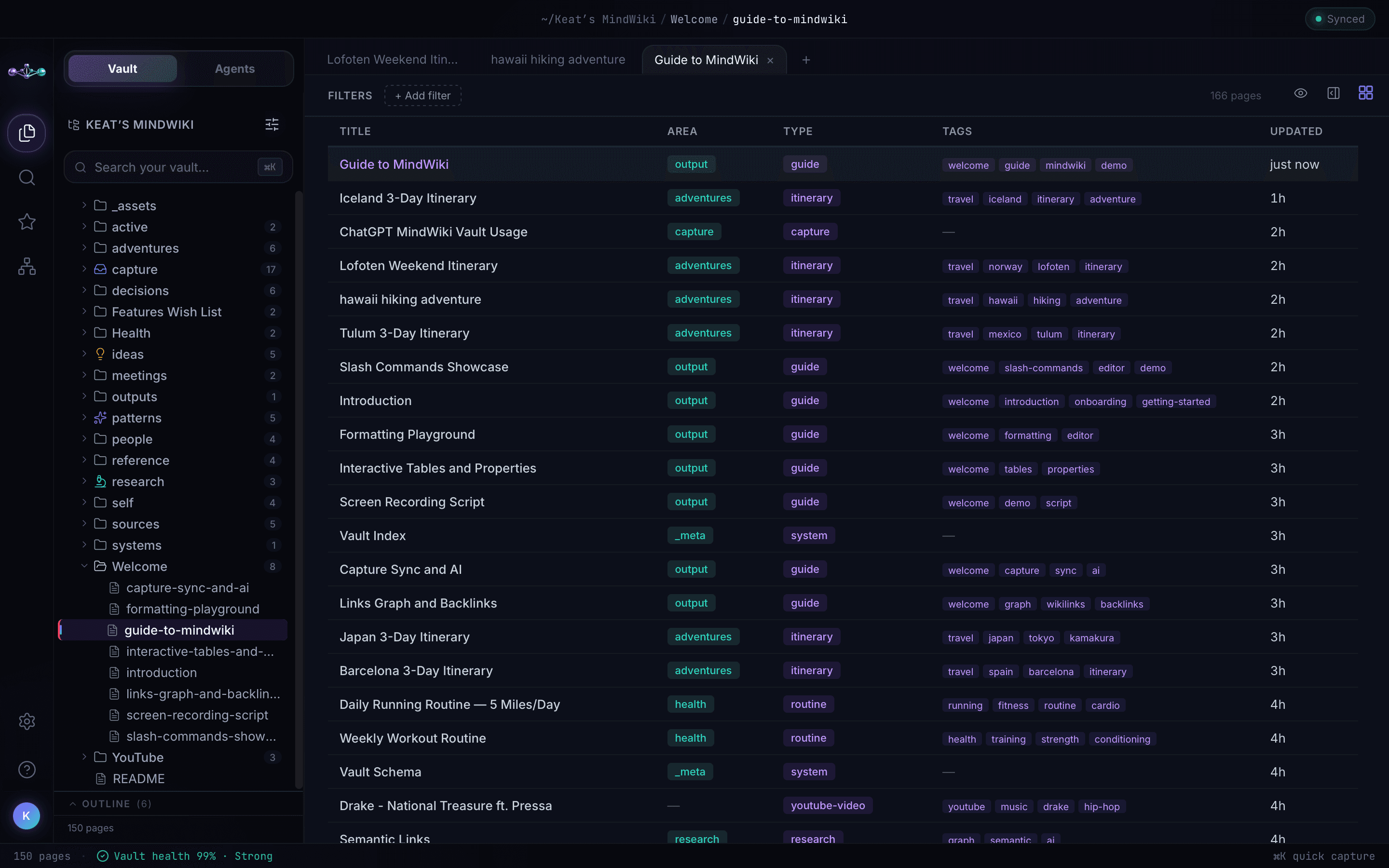
One collection. Five useful views.
Browse Files, Table, Kanban, Calendar, and Cards on web and Mac, with controls suited to each app. Use metadata to give your work a reusable shape.
Explore properties and views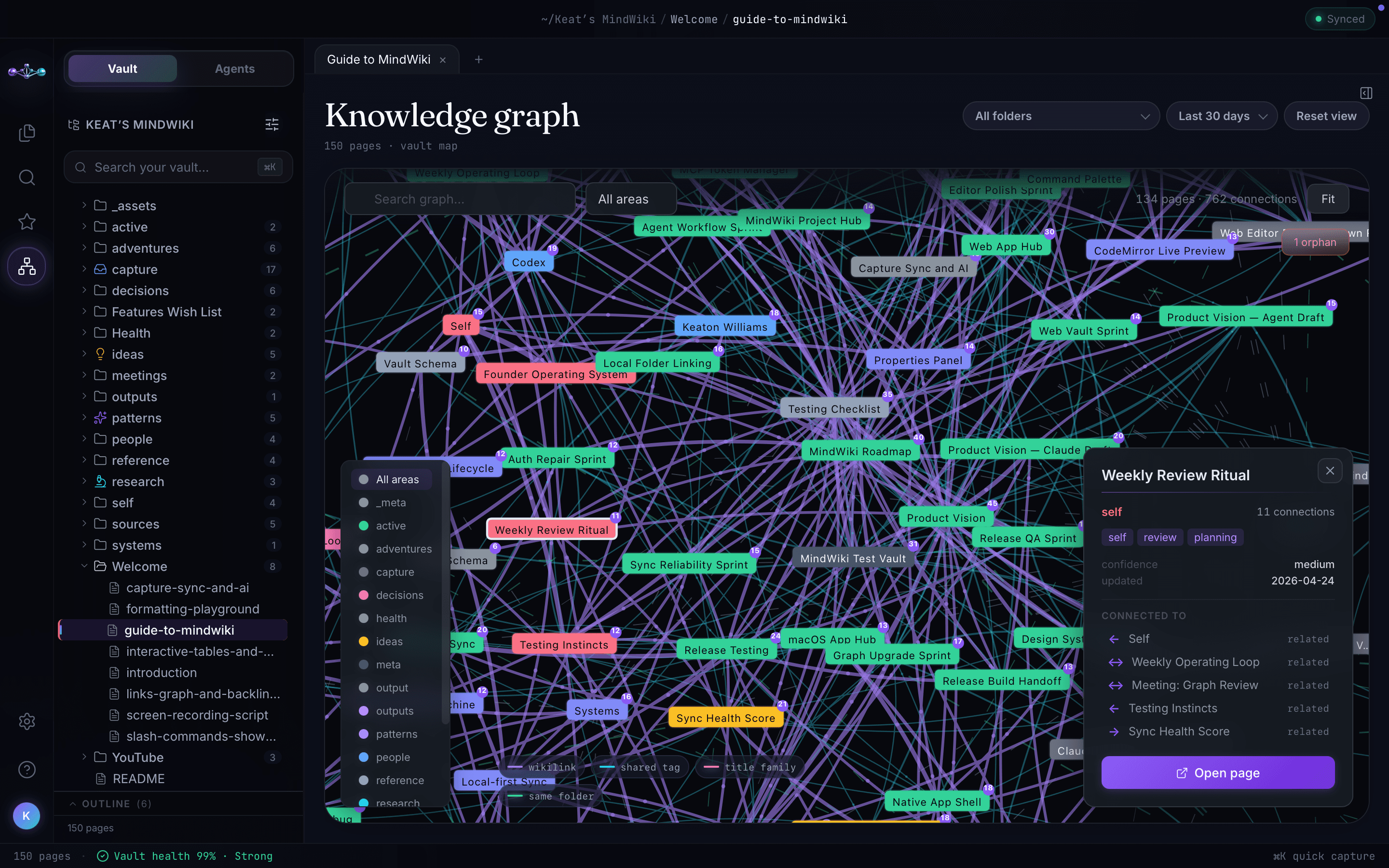
See how the pieces connect.
Wikilinks and backlinks trace specific references. The Mac graph adds a visual path through links and structural relationships across your knowledge.
Explore the knowledge graphStart with the capture inbox. Add folders, tags, and structure when they help the work.
Save it while it matters
From a useful moment
to a file you can use again.
Save a thought, a reference, or the useful part of an AI conversation. Your capture inbox gives it a home before you decide how to organize it.
Explore capture methodsForward a message. Find it in capture/.
Quick Capture
Type or paste a thought on the web.
Ask your agent
Save findings, decisions, or next steps.
Connect a workflow
Send supported content through the REST API.
Your knowledge, your control
Know what agents can do.
See what they did.
Choose access for the task. Inspect recorded activity and supported proposals in the Mac Agents workspace. Manage each platform connection from your account.
Explore agent controls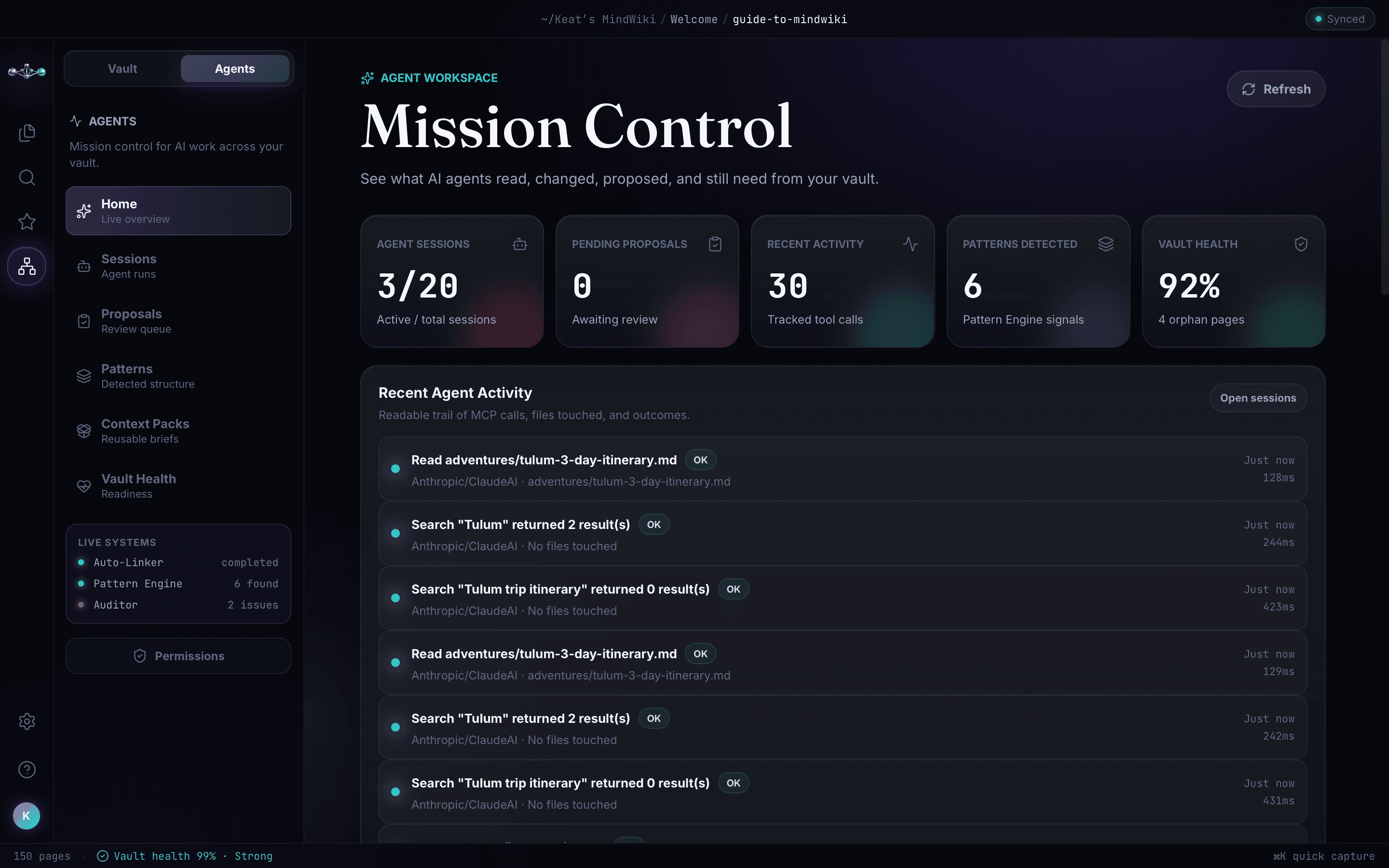
Clear access
Read retrieves knowledge. Capture adds inbox saving. Write permits broader supported changes. Vault permissions also apply.
Visible activity
Review recorded tool operations, results, and affected pages. Open the actual output to inspect the work.
Reviewable proposals
Inspect supported suggested changes and follow their required approval path.
Separate connections
Revoke one platform’s grant while keeping your other connections in place.
Your sign-in key stays on MindWiki’s own pages. Agents use their connection credentials.
Manage connectionsHelp your knowledge stay useful
Useful connections.
A little less housekeeping.
MindWiki’s scheduled automations suggest organization improvements and summarize activity between your interactive sessions.
They run on MindWiki’s infrastructure, separately from conversations in your chosen AI client.
Explore automationsAuto-Linker
Suggests useful wikilinks in recently changed pages.
Weekly Classifier
Reviews captures and proposes organization changes.
Pattern Detection
Surfaces candidate connections, overlaps, and inconsistencies.
Monthly Summary
Adds a page about the previous month’s activity.
Put your vault to work
A shared foundation
for what you keep building.
Projects & product work
Keep briefs, research, decisions, and progress together. Give the next session a useful starting point.
Coding & technical decisions
Bring specifications to your coding agent. Save debugging findings and implementation handoffs.
Research & learning
Collect sources, connect ideas, and compare findings against the knowledge you have saved.
Writing & creation
Keep outlines, voice guidelines, examples, and reference material close to the draft.
Personal knowledge
Save useful explanations, preferences, plans, and lessons in a form you can maintain.
Work across agents
Leave a handoff with decisions and next steps. Ask another connected agent to retrieve it and continue.
Get started
One vault.
A useful first connection.
Start with something worth keeping. You can build from there.
Create your vault
Start in MindWiki or through a supported agent connection. Existing users connect their current account.
Authorize your agent
Follow its platform guide, review the requested access, and complete authorization on MindWiki.
Save it. Retrieve it.
Keep a brief, decision, or finding. Ask your agent to read it back and identify the source page.
Your platform’s guide explains where to use this URL.
Explore the details
The tools behind
your shared workspace.
Write directly, connect an agent, or build a custom workflow. Follow any capability into its practical guide.
Keep & retrieve
Cloud vaultOne collection across your apps and authorized agents.
Markdown & exportReadable pages, optional YAML, and supporting files you can take with you.
AttachmentsAdd images, PDFs, audio, video, and supporting files on Mac; open supported synced references on web.
Search & hybrid retrievalFind page text and metadata, with keyword and semantic retrieval through agent tools.
Context PacksReuse current source pages for recurring work and prepare context for a goal.
Email & Quick CaptureTurn incoming messages, thoughts, and agent outcomes into inbox pages.
Write & connect
Live Markdown editorWrite with styling, checklists, callouts, code blocks, and auto-save on web and Mac.
Slash commands & shortcutsAdd structure and navigate without breaking your writing flow.
Interactive tablesEdit rows and cells on web and Mac, with a size picker on Mac.
Wikilinks & backlinksConnect a source to a decision and see where it is referenced.
Properties & viewsUse YAML and typed Mac properties; browse Files, Table, Kanban, Calendar, and Cards.
Knowledge graphExplore relationships on the Mac canvas; access graph data through supported tools.
Connect & control
MCP & REST APIUse compatible clients or build scripts with scoped credentials.
Agent capture & writingSave useful work and update pages with revision checks.
ProposalsInspect supported changes and follow their required approval path.
Mission Control & activityReview recorded sessions, tool activity, and proposals in the Mac Agents workspace.
Health & permissionsReview disconnected pages and control supported agent capabilities.
Connections & automationsRevoke individual grants and review scheduled organization suggestions.
A little more context
A few things
to know.
New to the idea of a shared vault? Start here, or explore the docs.
Read the overviewWhat is MindWiki?
MindWiki is a cloud vault for notes, supporting files, and project knowledge that you and your connected AI agents can use. It combines a human writing workspace with search, connected knowledge, capture, and authorized agent tools.
Can multiple AI agents use the same vault?
Yes. Connect compatible platforms to the same MindWiki account. Each has its own connection and uses the same vault through its authorized tools. Adding another platform does not require a second vault.
Does it automatically remember every conversation?
You choose what to save, or ask a connected agent to capture useful work. The agent retrieves relevant pages when it uses MindWiki tools. Connecting does not automatically import every past conversation or load your entire vault into every answer.
Where can I use MindWiki?
Open MindWiki Cloud in your browser, capture and read in the iPhone app, and use the richer native workspace on Mac. Your saved content syncs through the cloud vault. Features and controls vary by platform.
What kinds of files can I keep?
Keep Markdown pages and supported attachments including images, PDFs, audio, video, and other files. Add attachments through Mac and open supported synced references on the web. Preview, playback, and an agent’s ability to read an original file depend on the file type and client.
How does my MindWiki email work?
Send or forward a message to your personal capture address. It becomes a page in your capture inbox with available source information. Email attachments are currently noted in that page rather than stored as separate original files.
Can I control what an agent does?
Connection scopes and vault permissions determine the supported operations. Review activity and supported proposals, and revoke an individual platform grant from your account. Revocation stops future use of that grant; it does not erase content already retrieved into another platform.
Do I need more than one AI agent?
No. Start with your own notes or one agent across sessions. Add other compatible agents when it helps your work. They can retrieve the same knowledge after you connect them to your existing account.
Can I export my work?
Yes. Pages are readable Markdown with optional YAML metadata, and supported export includes your vault files. Keep attachments alongside their page references. Interactive presentation may differ in other applications. Sync is separate from keeping your own backup.
What is included in the Free plan?
During MindWiki’s full-access launch, Free, Pro, and Power include the same complete product capabilities, including agent writes, Context Packs, and automations. There is no Free monthly MCP/API operation cap. Scope permissions, common security protections, and your AI provider’s own account policies still apply.
Keep the work useful
Give your files and AI work
a shared home.
Start with one useful note. Connect an agent. Build a vault you can keep using across conversations, platforms, and devices.